
ThePhotoStick Omni is designed for a very specific problem: you have years of photos and videos spread across phones and computers, but you keep putting off backing them up.
Instead of relying entirely on cloud storage, the Omni combines physical flash storage with a dedicated app/software workflow that searches compatible devices and copies supported files onto the drive.

That sounds straightforward, but there are important details behind the marketing. The Omni isn’t a live cloud-sync system, it’s not a replacement for a proper multi-copy backup strategy, and user reports show that setup and reliability can vary by device.
Based on the available evidence, the product is a real, currently sold consumer backup device with a clear use case, but buyers should pay particular attention to compatibility, current checkout pricing, the 30-day return rules and the ambiguity around the separate hardware warranty.

Quick Verdict
ThePhotoStick Omni is a physical photo-and-video backup device designed for people who want a simpler alternative to manually sorting files or relying entirely on cloud storage.
Its biggest advantage is flexibility: the Omni is designed to work across Windows, macOS, iPhone/iPad and Android, with a free companion app for mobile devices. The Classic lineup also offers capacities from 32GB to 512GB, and the manufacturer says there are no monthly app fees.
The catch is that this is still a physical storage device. Public reviews include complaints about slow transfers, connection problems and confusing app behavior, while positive users praise the convenience and simplicity. It also should not be treated as your only backup copy.
Best fit: households with photos spread across multiple devices that want local, offline backup without a recurring subscription.
May not be ideal for: power users who want very fast transfers, continuous automatic cloud backup, or multi-terabyte storage.
Bottom line: ThePhotoStick Omni makes the most sense as a simple local backup tool, not as a complete replacement for a broader backup strategy.
What Is ThePhotoStick Omni?
ThePhotoStick Omni is a portable storage device built around a USB flash-drive format, with software intended to find and back up photos, videos and other supported files.
For computers, the manufacturer says the Omni does not require separate backup software to be installed on the computer. For iPhone and Android devices, the process uses the free ThePhotoStick Omni app.
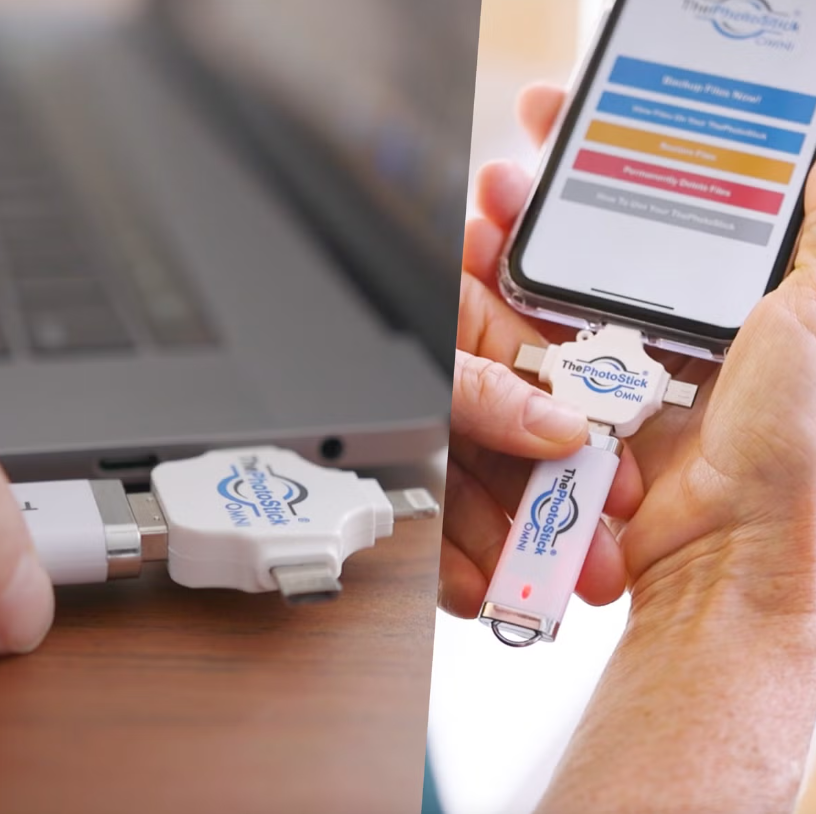
The current Classic range is available in 32GB, 64GB, 128GB, 256GB and 512GB versions. The manufacturer’s published photo-count estimates range from about 12,800 photos on 32GB to approximately 204,800 on 512GB, but those figures are only estimates because actual file sizes differ substantially.
That last point matters. A 4K video library can consume storage much faster than a collection of compressed phone photos, so don’t choose capacity based only on the headline photo count.
How does ThePhotoStick Omni work?
The actual workflow depends on the device.
On iPhone and iPad
The current iOS guide says to install the free ThePhotoStick Omni app, open it, connect the Omni through the phone’s Lightning or USB-C port, select the drive and grant the requested photo/file access. You then choose to back up all files, selected files or selected file types.
The guide specifically instructs users to grant Full Access so the app can access the device’s media library.
That’s useful to understand because “one click” doesn’t mean literally no setup. There is an initial permissions and connection process.
Apple itself supports external storage on iPhone through the Files app and compatible USB storage devices, so the basic concept of connecting external storage to an iPhone is standard platform functionality rather than something unique to ThePhotoStick.
On Android
The Android guide requires Android 8.0 or later and says Google Pixel compatibility begins with Pixel 8. Users install the Omni app, grant the required file permissions, connect the drive, select the drive and start the backup.
The Pixel restriction is an important practical detail. Someone with an older Pixel shouldn’t assume that “Android compatible” automatically means “compatible with every Android phone.”

On Windows
The current official August 2026 setup guide explicitly requires software installation. Users connect the device, open the drive in File Explorer and run the installer before launching ThePhotoStick Omni software.
On macOS
The macOS guide similarly requires users to open the drive, launch the installer and place ThePhotoStick Omni into Applications. The instructions also describe what to do if macOS shows a security warning.
That directly contradicts the common affiliate claim that the Omni requires “no software install.” The official documentation is the better source.
What does ThePhotoStick Omni actually do?
At its simplest, the Omni does three things:
Find files: The software scans supported locations for supported media and file formats.
Copy files: The selected data is written to physical storage on the drive.
Organize/access files: The manufacturer says the companion software is designed to help organize and access the backed-up material.
This solves a genuine problem. Many people don’t lack storage; they lack a backup routine.
But there is an important distinction between photo backup convenience and complete data protection.
The Omni will not protect you against every failure scenario. A physical drive can be lost, damaged, stolen or fail. And because the process isn’t a continuous cloud sync, a new photo taken after the previous backup isn’t automatically protected just because the Omni exists.
The company’s own terms explicitly encourage users to maintain additional backup storage and to back up data before using ThePhotoStick.
That is a much more important caveat than most affiliate reviews give it.
ThePhotoStick Omni Features That Actually Matter
Cross-device compatibility
The Omni is designed for mixed-device households. Current official system requirements list:
| Platform | Official requirement |
|---|---|
| Windows | Windows 7 SP1 or later |
| Mac | macOS 10.13 or later |
| iPhone/iPad | iOS/iPadOS 13 or later |
| Android | Android 8.0 or later |
This is useful when one household has an iPhone, an Android phone, a MacBook and a Windows desktop.
It is less important if you only use one platform and are already comfortable with that platform’s native backup tools.
Automatic photo and video backup
The software is designed to search for supported files rather than forcing the user to manually select everything.
That is the core reason to buy an Omni instead of a generic blank flash drive.
Offline operation
The manufacturer says the Omni does not require Wi-Fi for backup.
That’s convenient for travel, poor-connectivity environments or users who simply prefer not to upload their entire library to a cloud service.
Multiple storage capacities
The current Classic range makes it possible to buy for a smaller library or scale to 512GB.
The official estimates are:
| Capacity | Approx. photos/videos* | Current observed sale price |
|---|---|---|
| 32GB | 12,800 | $44.99 |
| 64GB | 25,600 | $64.99 |
| 128GB | 51,200 | $89.99 |
| 256GB | 102,400 | $143.99 |
| 512GB | 204,800 | $199.99 |
*Manufacturer estimate; actual storage depends on file type and size. Prices observed on the official site during this research and may change.
File-format support
The official product documentation lists common formats including JPEG, HEIC, PNG, GIF, MOV and MPEG4, along with many RAW and other file types.
That means the product isn’t limited strictly to basic JPEG camera photos.
My testing and research methodology
This is not a hands-on review.
I did not receive or personally test a ThePhotoStick Omni, so I am not claiming to have measured:
- Transfer speeds
- Actual backup completion times
- Long-term flash-drive endurance
- Temperature during large transfers
- Real-world battery drain
- Failure rate
- Physical durability
Instead, this assessment combines first-party documentation with app-store evidence, retailer listings, independent consumer reports and established backup/security guidance.
That distinction matters. A review that claims to have personally tested thousands of files without showing how, on what hardware, or for how long doesn’t provide much useful evidence.
ThePhotoStick Omni vs Omni X: What’s the Difference?
This is a particularly important buying question in 2026.
ThePhotoStick Omni Classic remains the broader-capacity, value-oriented lineup, while Omni X is the newer generation introduced in April 2026. The X uses a metal-alloy body, built-in USB-A, USB-C, Lightning and Micro-USB connectors, and USB 3.0 hardware.
| Feature | Omni Classic | Omni X |
|---|---|---|
| Positioning | Existing/value-oriented model | Newer premium model |
| Storage | 32GB–512GB | 16GB–256GB |
| Connectors | Multi-connector design | Built-in connectors |
| USB standard | Official Classic spec lists USB 2.0 hardware | USB 3.0 |
| Body | Classic design | Metal-alloy casing |
| Best reason to choose | Capacity/value | Newer design and faster hardware |
The X is not simply a different storage size. It is a separate generation.
A buyer searching “ThePhotoStick Omni” should therefore confirm the exact model before checkout.
ThePhotoStick Omni Benefits
The strongest benefits are practical rather than flashy.
It simplifies backup. People who avoid manually moving files may find the guided process easier.
It works across different device ecosystems. That is especially useful in families where Apple and Android hardware coexist.
It does not require a monthly subscription. The manufacturer says the app is free and carries no monthly charges.
It can operate without Wi-Fi. The data is being copied to physical storage rather than relying on an online upload during the backup process.
It gives you a local copy. That can be useful for people who want physical control of their files.
ThePhotoStick Omni Limitations and Drawbacks
It is not automatically a complete backup strategy
This is the biggest conceptual limitation.
If your only copy is on the Omni and the device is lost, damaged or fails, your photos are still at risk.
The company’s own terms explicitly encourage users to maintain additional backup storage.
For important memories, use the Omni as one copy among several, not as the sole repository.
Transfer speed may be a concern
The Classic product documentation lists a read speed of up to 30MB/s. That’s a manufacturer specification, not a guarantee of sustained backup speed on every phone or computer.
Public reviews describe both successful transfers and cases where large backups took hours or appeared to stall. Those reports are useful warning signals but should not be treated as controlled performance measurements.
Mobile use depends on an app
That adds a layer of software dependency.
The Omni is not just a passive USB stick for phone use; the mobile workflow depends on the companion app and device permissions.
Software support is not guaranteed forever
The company’s terms say its software is provided “as is,” disclaims express and implied warranties for the software, and says it is not obligated to provide software updates.
That is worth considering if you expect to keep the device for many years.
The warranty/return language deserves a careful read
The money-back policy is straightforward: the current return page says you can return the product within 30 days of delivery for a full refund of the purchase amount, while return shipping is the customer’s responsibility and shipping/handling and taxes are non-refundable.
There is also a documentation mismatch worth flagging. One official page describes the limited warranty as covering defects within 30 days after shipment, while the Terms page describes the period in relation to delivery.
For a purchase with a longer expected lifespan, that’s a reason to confirm the latest warranty terms before ordering.
Is ThePhotoStick Omni Legit?
The evidence supports treating ThePhotoStick Omni as a real, identifiable commercial product, not a fictional storefront.
Prairie IT LLC is the company identified by the manufacturer and by the Better Business Bureau, with a business profile in Haxtun, Colorado. BBB currently shows an A- rating, says the business is not BBB accredited, and lists 17 complaints on the profile. BBB also notes that complaint information should be considered alongside the company’s size and response history.
That does not prove that every customer will have a good experience.
Public feedback is mixed. The iOS app currently shows 4.5/5 from about 4.4K ratings, Google Play shows about 4.2/5 from 1.48K reviews, and an Amazon 128GB listing shows 3.9/5 from 9,261 reviews in the current page data. Trustpilot’s company-level profile is substantially more mixed, at 3.0/5 across 573 reviews, with a high share of one-star reviews. These platforms measure different populations and should not be treated as a single product score.
The useful takeaway is not “all reviews are good” or “all reviews are bad.”
It is that ease of use is real for some users, while connectivity, speed, app behavior and support can be pain points for others.
Pros & Cons of ThePhotoStick Omni
Pros
Simple physical backup concept
The central idea is easy to understand: files end up on a physical drive you control rather than exclusively inside an online storage account. That’s useful for people who prefer tangible storage.
Multi-device workflow
The Omni’s most meaningful differentiator is the attempt to cover phones, tablets and computers through a single product family rather than requiring a separate storage solution for each platform.
No recurring storage subscription
There’s no required monthly cloud-storage subscription associated with the core product.
Broad file-type support
The published extension list goes well beyond ordinary JPEG photographs.
Cons
It isn’t continuous backup
You have to connect the device and run the backup. It won’t protect every new file taken after the last backup session unless you run it again.
Initial setup is more involved than “plug and click”
Mobile devices require permissions and drive selection; Windows and macOS require software installation.
User experiences are mixed
Current app-store feedback includes complaints about slow performance, drive recognition and backup behavior.
Hardware specifications aren’t unusually transparent
The company’s terms state that it may substitute USB drives and that the physical drive received may differ from marketing images.
Warranty language needs clarification
The 30-day return policy is straightforward, but the separate warranty language is not clearly written around the Omni in the same way a buyer might expect from a conventional hardware warranty.
What I like about ThePhotoStick Omni
The strongest part of the product is not the flash memory itself.
It is the behavior change.
A standard USB drive is inexpensive and easy to buy, but a technically capable person still has to decide what to copy, where the files are located and how to organize them.
ThePhotoStick is trying to remove some of that friction with a dedicated scanning and backup workflow.
That’s particularly relevant for someone who has 20,000 photos but has never established a reliable backup habit.
The official mobile instructions also make the process more approachable by allowing users to choose between backing up everything, selecting files manually or filtering by type.
What concerns me
The warranty is the biggest documentation issue
The current return page clearly covers Omni under the 30-day return policy, but the limited-warranty paragraph names ThePhotoStick and ThePhotoStick Mobile rather than clearly defining an Omni-specific warranty period. The terms page also uses broad ThePhotoStick terminology rather than an especially detailed Omni hardware warranty.
For a storage product intended to hold irreplaceable family memories, I’d want this clarified before purchase.
The company says the actual USB hardware can change
The terms explicitly state that USB drives may be substituted and may not look like the marketing photographs.
That doesn’t mean the product is defective. It does mean that reviewers shouldn’t invent precise claims about casing materials, controller hardware or durability based only on a product photograph.
The software isn’t guaranteed to be supported forever
The terms state that the company is not obligated to provide software updates. That’s a notable consideration for a product whose usefulness depends heavily on compatibility with constantly changing operating systems and phone hardware.
This is especially relevant because Apple has moved from Lightning to USB-C on newer iPhones, and operating-system behavior changes over time. Apple currently supports external storage on compatible iPhones, but compatibility should still be checked against the exact device.
ThePhotoStick Omni price and value
Pricing is one of the messier parts of the current site.
The main official Omni Classic collection currently shows:
| Capacity | Current displayed sale price |
|---|---|
| 32GB | $44.99 |
| 64GB | $64.99 |
| 128GB | $89.99 |
| 256GB | $143.99 |
| 512GB | $199.99 |
However, other official pages currently advertise different promotional prices, including code-based offers such as $47.99 for 32GB, $63.99 for 64GB, $79.99 for 128GB and $119.99 for 256GB, while another page shows a 512GB price of $199.99.
The practical lesson is simple:
Do not treat an affiliate site’s “regular price” or “today-only discount” as a reliable benchmark. Check the actual checkout total.
That is especially important because the FTC recommends comparing the total cost, shipping, return policy and seller terms rather than relying on a headline price.
Is it good value?
The answer depends on what you’re paying for.
If all you want is 128GB of flash storage, a conventional drive can be much cheaper.
You’re paying a premium for:
- Dedicated software
- Cross-platform workflow
- Guided photo searching
- Convenience for less-technical users
- A physical device designed specifically around photo backup
That’s a legitimate value proposition, but it makes much less sense for a technically comfortable buyer who already knows how to use external storage and backup software.
Shipping, returns and support
The current official site says orders generally ship within 1–2 business days, while the shipping policy quotes 5–8 business days in transit for U.S. destinations.
The company advertises free U.S. shipping for orders of $50 or more. That means the 32GB drive can have a different delivered cost from the 64GB or larger versions depending on checkout shipping.
The return policy gives buyers 30 days from delivery to return an Omni for a refund of the purchase amount, excluding shipping, handling and taxes. The terms state that return postage is the customer’s responsibility and that the company can take up to 30 days to issue the return credit after the returned item has been received, inspected and accepted.
Support is available through live chat; the support center currently lists chat hours of Monday through Saturday, 8 a.m. to 8 p.m. Pacific Time.
What do ThePhotoStick Omni reviews say?
The consumer evidence is mixed.
On Apple’s U.S. App Store, the Omni app currently has approximately 4.5/5 from 4.4K ratings.
Google Play currently shows approximately 4.1/5 from 1.63K reviews.
Positive reports tend to describe successful backups and appreciation for the convenience. Negative reports include slow operation, problems detecting the drive, incomplete-looking results and difficulties during transfers.
Those reviews shouldn’t be treated as a laboratory failure-rate calculation. But they are relevant because the product’s main selling point is ease of use. When users report that setup isn’t easy, that’s directly relevant to the buying decision.
ThePhotoStick Omni and privacy
This area deserves more attention than it usually gets in affiliate reviews.
The Google Play listing currently states that the developer reports no data shared with third parties and no data collected, while also saying that the app’s data is not encrypted and cannot be deleted. Google explains that data-safety information comes from the app developer and may vary by use, region and age.
The Apple App Store likewise lists the app as Data Not Collected, but Apple explicitly says these privacy disclosures are developer-provided rather than independently verified by Apple.
I would therefore avoid making an absolute statement such as “your photos are fully encrypted” or “your data can never leave your device” unless the company supplies stronger technical documentation.
The practical privacy advantage is that the core backup destination is a physical drive rather than a subscription cloud account. But buyers should still understand exactly what permissions the app is requesting and what its current privacy disclosure says.
ThePhotoStick Omni vs. alternatives
There are three meaningful alternatives depending on what you actually need.
| Option | Main advantage | Main trade-off |
|---|---|---|
| ThePhotoStick Omni | Guided backup workflow across phones/computers | Higher price than ordinary flash storage; app-dependent |
| SanDisk iXpand Flash Drive Luxe | Purpose-built phone storage with Lightning + USB-C and established storage-brand support | More focused on Apple/phone workflows and still relies on companion software for some functions |
| SanDisk Ultra Dual Drive Luxe | Standard dual USB-C/USB-A storage with high published read-speed specification | More manual file-management experience |
| Cloud backup such as iCloud/Google Photos | Automatic syncing and off-site access | Ongoing subscription/storage costs and account dependence |
SanDisk’s iXpand Luxe documentation lists 64GB, 128GB and 256GB versions, a Lightning/USB-C-oriented design and a 2-year warranty.
The SanDisk Ultra Dual Drive Luxe offers USB-A and USB-C connectivity and a published maximum read speed of up to 400MB/s on the 128GB model; Best Buy currently lists the 128GB model around $35.99, although retail pricing changes.
That illustrates the central Omni trade-off:
The more specialized the software workflow, the more you’re paying for convenience rather than raw storage.
When an ordinary USB drive makes more sense
A standard drive is a sensible alternative when:
- You already understand folders and file management.
- You’re mostly backing up a Windows PC or Mac.
- You don’t need a special photo-scanning workflow.
- You care more about storage capacity per dollar.
When cloud backup makes more sense
Cloud storage is more appropriate when you want:
- Continuous syncing.
- Access from anywhere.
- An off-site copy in case your home is affected by theft, fire or water damage.
- Easy restoration onto a replacement phone.
CISA’s backup guidance emphasizes the 3-2-1 approach: three copies, on two different types of media, with one copy stored off-site.
For that reason, I wouldn’t treat a single Omni as your only copy of irreplaceable family photos.
Is ThePhotoStick Omni legit?
The available evidence supports the conclusion that ThePhotoStick Omni is a real commercial product sold by an identifiable company, rather than an anonymous one-page storefront.
There is an official product site, published support documentation, dedicated apps in Apple’s App Store and Google Play, a listed U.S. business address, and a BBB profile for Prairie IT LLC.
The BBB currently lists Prairie IT LLC with an A- rating, says the business is not BBB accredited, and shows 17 complaints in its profile. Complaints themselves aren’t proof of fraud or poor overall performance; they are evidence that some customers have reported problems.
The more useful conclusion is:
The product is verifiably real, but “legitimate product” should not be confused with “guaranteed to work perfectly for every device and user.”
The app-store evidence demonstrates that compatibility and usability problems do occur for some customers.
What about “ThePhotoStick Omni Consumer Reports”?
This phrase deserves special caution.
I did not find a current Consumer Reports review for the Omni.
A number of affiliate pages use phrases such as “Consumer Reports,” “consumer report,” or “buyers beware,” but being published on a website with those words in a headline does not make the content an official Consumer Reports evaluation.
That matters because a buyer searching “ThePhotoStick Omni Consumer Reports” can easily encounter SEO pages that create the impression of third-party institutional testing when there isn’t evidence of such a review.
For this article, I would not use “Consumer Reports rating,” “Consumer Reports score,” or similar language unless an actual Consumer Reports publication can be independently verified.
Who should buy ThePhotoStick Omni?
The product makes the most sense for someone who has a simple problem:
“I have a lot of photos, I know I should back them up, and I haven’t been doing it.”
Examples include a family with years of phone pictures, a parent who isn’t comfortable managing folders and cloud storage, or someone moving photos from several household devices into a physical archive.
The convenience-oriented design is the main reason to consider it.
Who should not buy it?
You may be better served by another solution when:
You are already good at backups
If you already use external drives, cloud storage, automated backup software or NAS storage, the Omni may add less value.
You need off-site redundancy
A USB drive sitting beside your laptop doesn’t protect you if both are stolen or destroyed.
You need very predictable long-term software support
ThePhotoStick’s terms explicitly say that it is not obligated to provide software updates.
You only need cheap storage
A conventional flash drive can cost substantially less per gigabyte.
Your phone is outside the requirements
Pay special attention to iOS/Android versions and the Pixel limitation.
How to buy ThePhotoStick Omni
The most transparent route is to start at the official ThePhotoStick store, where the product, support information, return terms and system requirements can be checked together.
Before ordering:
- Check your phone or computer’s operating-system version.
- Check how many GB your photos and videos currently occupy.
- Choose enough capacity to leave headroom.
- Compare the checkout price rather than relying on a “regular price.”
- Check whether your order crosses the $50 U.S. free-shipping threshold.
- Read the return terms carefully.
- Save your receipt and order confirmation.
The FTC specifically recommends checking total cost, seller policies, delivery expectations and return terms, and keeping records of the purchase.
How to Use ThePhotoStick Omni
For a phone or tablet:
- Install the free ThePhotoStick Omni app.
- Grant the permissions requested by the app.
- Connect the Omni.
- Follow the in-app setup instructions.
- Start the backup and allow it to finish.
- Confirm that files are actually present on the drive before deleting anything from the phone.
For a computer, the manufacturer says you can start without installing separate backup software.
One practical rule
Never delete the originals simply because the backup process says “complete.”
Open the destination files and verify them first.
How to Choose the Right ThePhotoStick Omni Capacity
Think in terms of your actual library rather than the marketing photo count.
A 32GB model may be sufficient for a relatively small library.
A 128GB model provides significantly more headroom.
A 256GB or 512GB model becomes more sensible when you’re combining several devices, years of photos and substantial video.
Also remember that capacity can disappear quickly when your library includes 4K video, RAW photographs or large edited files.
How to Order ThePhotoStick Omni
Before purchasing, check four things:
First, verify the exact model. Make sure you’re buying Omni Classic versus Omni X intentionally.
Second, verify your device requirements. Current official requirements list Windows 7 SP1+, macOS 10.13+, iOS/iPadOS 13+ and Android 8+.
Third, check the current price and shipping terms. The official site changes promotions frequently. Current US shipping information lists 5–8 business days in transit, while the product page indicates 1–2 business days before shipment for in-stock items.
Fourth, test it soon after delivery. The current money-back return window is 30 days from delivery, and the customer is responsible for return postage.
FAQ’S About ThePhotoStick Omni
Is ThePhotoStick Omni worth buying?
It can be worth considering for buyers who value a simplified physical backup workflow more than low-cost storage. It makes less sense when you’re already comfortable managing ordinary external drives or automated cloud backups.
How does ThePhotoStick Omni work?
You connect the drive, install/open the appropriate software, grant the required permissions and choose the files you want backed up. Windows and macOS require desktop software; iOS and Android use the Omni app.
How much does ThePhotoStick Omni cost?
The official store currently lists different sale prices by capacity, with roughly $44.99 for 32GB up to $199.99 for 512GB on its Omni Classic collection. Promotional pages show different temporary prices, so verify the checkout amount before ordering.
Is ThePhotoStick Omni legit?
There is substantial evidence that it is a real commercial product: official documentation, app-store listings, an identifiable business and customer-support infrastructure. That does not mean every user will have a trouble-free experience.
Does ThePhotoStick Omni replace cloud backup?
Not necessarily. It can serve as a physical backup, but it does not automatically provide the same off-site redundancy or continuous synchronization as a cloud service. CISA recommends multiple copies and an off-site backup for important data.
What is the biggest thing to check before buying?
Check your exact device compatibility and the current return/warranty terms. The 30-day return policy is clear, but the published warranty wording is less explicit about Omni than I’d prefer.
Does ThePhotoStick Omni need Wi-Fi?
No for the local backup process. The manufacturer specifically markets the Omni as a backup device that does not require Wi-Fi.
Does ThePhotoStick Omni work with iPhone?
Yes. Current official requirements list iOS/iPadOS 13.0 or later, with the mobile workflow using the ThePhotoStick Omni app.
Does ThePhotoStick Omni work with Android?
The current official requirements list Android 8.0 and later. Device-specific compatibility should still be checked if you use an unusual or older handset.
Is ThePhotoStick Omni a subscription?
No monthly app fee is currently advertised. The manufacturer says the mobile app is free to download and use with the Omni.
Does ThePhotoStick Omni delete duplicate photos?
The manufacturer markets duplicate detection as a feature. However, individual user reports show that duplicate handling can be a source of confusion, so users should verify results rather than assuming that every backup will behave exactly the same way.
Is ThePhotoStick Omni a complete backup solution?
No. It provides a physical backup copy, but it should not be your only copy. The company’s own terms recommend maintaining additional backup storage.
How long does ThePhotoStick Omni last?
The available public documentation does not establish a guaranteed service life for the storage hardware. Because software updates are not guaranteed, long-term ownership should include maintaining additional copies of important data.
Is ThePhotoStick Omni better than iCloud or Google Photos?
That depends on the priority. The Omni offers physical, offline storage with no monthly app fee, while cloud services provide easier continuous syncing and off-site access. For important memories, the two approaches can complement each other rather than requiring an either/or choice.
Final verdict
ThePhotoStick Omni is best understood as a convenience-focused physical photo backup system, not a magical storage technology.
Its principal advantage is the combination of physical storage and purpose-built software aimed at reducing the work involved in finding and backing up photos and videos across compatible devices. The cross-platform concept is useful, and the absence of a recurring storage subscription is attractive to many buyers.
The biggest drawbacks are less obvious: current user feedback is mixed, initial setup is more involved than “one click” marketing suggests, exact hardware specifications aren’t especially transparent, software support isn’t guaranteed indefinitely, pricing varies across official pages, and the warranty language needs clarification for Omni specifically.
So the buying decision comes down to one question:
Are you paying for storage, or are you paying for simplicity?
If you primarily want inexpensive gigabytes, a conventional external drive may make more sense.
If the real problem is that you’ve been procrastinating on photo backup because the process feels complicated, the Omni’s dedicated workflow is the part that potentially justifies its higher price.
Most importantly, don’t use it as your only copy of irreplaceable memories. A second, geographically separate backup remains sensible.