You’ve probably heard the hype. Mechanical keyboards feel better, last longer, and somehow make typing more satisfying. But walk into any electronics retailer or browse online, and you’re immediately buried in jargon: linear versus tactile, hot-swappable PCBs, PBT keycaps, Hall Effect switches, 75% layouts, N-key rollover. It’s overwhelming.
Here’s the reality: most of that terminology matters less than you think for most people. The mechanical keyboard market hit $1.8 billion in 2025** and is projected to reach **$3.09 billion by 2030, growing at nearly 13% annually. That explosive growth means more options than ever-but also more confusion. This guide cuts through the noise.
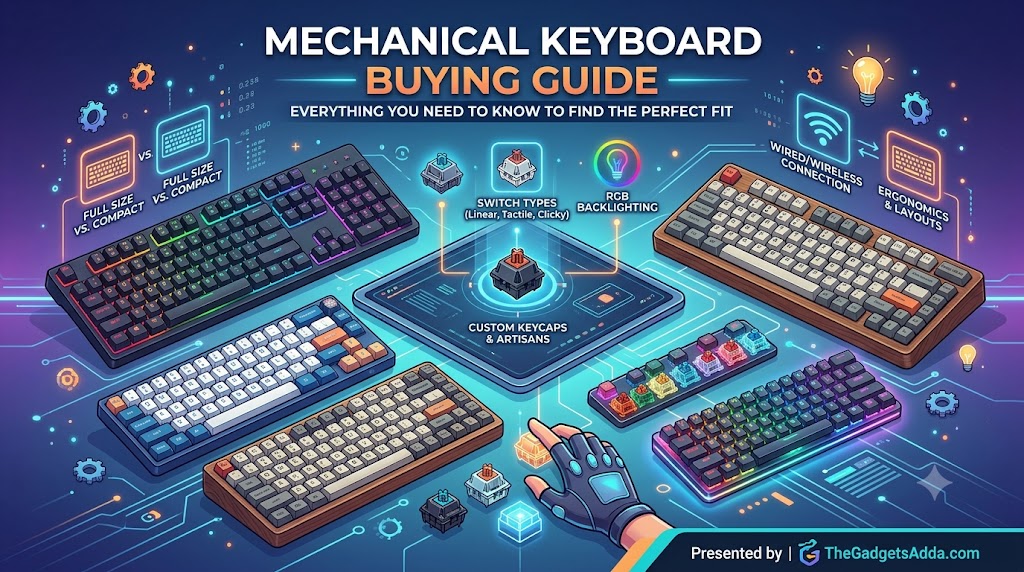
By the end, you’ll know exactly which switch type fits your fingers, what size keyboard belongs on your desk, which features are worth paying for, and how to avoid the mistakes that leave first-time buyers with a keyboard they regret.
What Is a Mechanical Keyboard-and Why Does It Matter?
Unlike a membrane keyboard, which presses a rubber dome against a circuit board, a mechanical keyboard uses an individual spring-loaded mechanical switch beneath every key. That single difference changes everything about how typing feels.
The Membrane Keyboard Problem
Most cheap keyboards use a rubber dome membrane. Press a key, and the dome collapses to complete a circuit. The feel is mushy. The registration is imprecise. And when that rubber deteriorates-which it does-keys become sticky, unresponsive, or fail entirely.
H3: What Makes Mechanical Keyboards Different
Each mechanical switch contains a spring, a stem, and metal contacts. Press the key, and the stem pushes the spring down until the contacts meet, registering the keystroke. That mechanism delivers:
- Consistent feel-every key press feels identical, from day one to year five
- Faster registration-mechanical switches actuate before you bottom out
- Durability-quality switches like Cherry MX are rated for ~100 million keystrokes
- Customizability-swap switches, change keycaps, tune the sound
The trade-off? More decisions, higher upfront cost, and (depending on your switch choice) more noise.
Step 1: Choose Your Switch Type-The Single Most Important Decision
The switch determines how your keyboard feels and sounds. Get this wrong, and no other feature will save you. Get it right, and everything else falls into place.
Switches fall into four broad categories in 2026:
Linear Switches-Smooth and Silent
Linear switches move straight up and down with no bump and no click. They’re the fastest switches because nothing slows your finger down.
- Best for: Gaming (especially FPS), quiet offices, anyone who prefers a smooth press
- Common examples: Cherry MX Red, Gateron Yellow, Razer Yellow
- Actuation force: Typically 45g-60g
- Sound profile: Quiet, with only the sound of the key bottoming out
If you’re unsure which switch to choose, linear is the safest all-rounder. Gamers tend to prefer them for the speed and consistency.
Tactile Switches-Feedback Without Noise
Tactile switches have a noticeable bump partway through the press that tells you the key has registered. You feel the actuation point, so you know exactly when the key triggers.
- Best for: Typists, programmers, anyone who wants confirmation without the click
- Common examples: Cherry MX Brown, Boba U4T, Holy Panda X
- Actuation force: Typically 45g-65g
- Sound profile: Moderate-quieter than clicky, louder than linear
Touch typists often prefer tactile because the bump helps avoid bottoming out, reducing finger fatigue over long sessions.
Clicky Switches-Satisfying but Loud
Clicky switches combine a tactile bump with an audible click at the actuation point. They’re the most polarizing switch type.
- Best for: People who type alone or enjoy the classic mechanical sound
- Common examples: Cherry MX Blue, Gateron Blue, Kailh Box Navy
- Actuation force: Typically 50g-70g
- Sound profile: Loud and distinctive
Skip clicky switches if you work in a shared office, live with others, or record audio. Your coworkers will thank you.
Hall Effect (Magnetic) Switches-The 2026 Game-Changer
Hall Effect switches use magnets and sensors instead of physical metal contacts. They never wear out mechanically and allow you to adjust the actuation point-from a hair-trigger 0.5mm to a full 4mm.
- Best for: Competitive gamers, enthusiasts who want maximum control
- Common examples: Gateron Hall Effect, Corsair MGX Hyperdrive
- Key features: Adjustable actuation, Rapid Trigger, 0.1ms response latency
- Sound profile: Varies by design
At CES 2026, Hall Effect switches were featured on most flagship keyboards, moving from niche to mainstream. If you’re a competitive gamer, this is worth serious consideration.
Switch Decision Matrix
| Use Case | Recommended Switch | Why |
|---|---|---|
| Competitive gaming | Linear or Hall Effect | Speed and consistency |
| Daily typing / writing | Tactile | Feedback without fatigue |
| Office / shared space | Linear (silent) or Silent Tactile | Minimal noise |
| Mechanical nostalgia | Clicky | Classic feel and sound |
| Mixed use (work + play) | Linear | Versatile and forgiving |
Step 2: Pick Your Layout and Size
Keyboard size-or form factor-determines how much desk space you reclaim and which keys you sacrifice. Starting with the largest and moving down:
Full-Size (100%)-104 Keys
The classic layout. Includes the main alphanumeric block, function row, navigation cluster, and a dedicated number pad.
- Best for: Data entry, accounting, anyone who uses the numpad daily
- Desk footprint: ~17 inches wide
- Trade-off: Takes up significant desk space, pushes your mouse farther right
If you work with spreadsheets or enter numbers frequently, the numpad is non-negotiable.
Tenkeyless (TKL / 80%)-87 Keys
Removes the numpad but keeps everything else: function row, navigation cluster, arrow keys.
- Best for: Gamers, programmers, general users who rarely use a numpad
- Desk footprint: ~14 inches wide
- Trade-off: Better ergonomics-mouse sits closer to center
TKL is the most popular layout among gamers because it maximizes mouse space without sacrificing function keys.
75%-~84 Keys
A compact layout that keeps the function row and arrow keys but condenses everything into a tighter footprint.
- Best for: Most people-the sweet spot between functionality and size
- Desk footprint: ~12–13 inches wide
- Trade-off: Some keys (like Home, End, Page Up/Down) move to function layers
75% is the recommendation for most buyers. It keeps everything you use daily while freeing up significant desk space.
H3: 65%-~68 Keys
Removes the function row entirely. Keeps arrow keys and a condensed navigation cluster.
- Best for: Small desks, minimalists, travelers
- Desk footprint: ~11-12 inches wide
- Trade-off: Function keys require holding the Fn key
60%-~61 Keys
The smallest “regular” layout. Removes the function row, navigation cluster, arrow keys, and numpad.
- Best for: FPS gamers, ultra-minimalists, maximum mouse space
- Desk footprint: ~10-11 inches wide
- Trade-off: Everything beyond alphanumerics requires Fn-layer combinations
Step 3: Understand Build Quality and Materials
Switch type and layout determine how the keyboard feels. Build quality determines how long it lasts.
Case Material
Plastic cases are lighter, cheaper, and more common at budget price points. Aluminum cases add weight, premium feel, and reduce flex. An aluminum frame signals quality-Keychron’s Q series, for example, uses full aluminum bodies that feel genuinely substantial.
Mounting Style
The mounting style affects flex, sound, and typing feel:
- Tray mount: The PCB screws directly into the case. Stiff, consistent feel. Common on budget boards.
- Gasket mount: The PCB sits on rubber or silicone gaskets, floating between the plate and case. Provides a softer, bouncier typing feel with deeper sound.
- Top mount: The plate attaches to the top case. Balanced between stiff and soft.
Gasket-mounted keyboards are increasingly common in the $80-$150 range and deliver a noticeably more premium typing experience.
Plate Material
The plate sits between the switches and the PCB:
- Steel: Stiff, produces a higher-pitched sound
- Aluminum: Balanced, common on mid-range boards
- Brass: Dense, produces a deeper sound
- Polycarbonate / POM: Flexible, produces a thocky, muted sound
- FR4: PCB material used as a plate-flexible and affordable
Plate material matters more to enthusiasts than casual buyers, but if you’re chasing a specific sound profile, it’s worth knowing.
Step 4: Keycaps-The Part Your Fingers Actually Touch
Keycaps affect texture, durability, sound, and aesthetics. Two materials dominate:
ABS (Acrylonitrile Butadiene Styrene)
Pros: Smooth texture, better light transmittance for RGB, cheaper to produce, more vibrant colors
Cons: Develops a shiny “oily” appearance over time from finger oils, can fade or yellow
Most stock keyboards come with ABS keycaps. They feel fine initially but wear poorly over extended use.
PBT (Polybutylene Terephthalate)
Pros: Durable, textured feel, resists oil and shine, doesn’t fade, produces a deeper sound
Cons: More expensive, less vibrant color options, slightly more difficult to mold into intricate designs
PBT is the better long-term investment. If you type daily, the difference becomes obvious within months.
Keycap Profiles
The profile-the shape and height of the keycaps-affects typing comfort:
- OEM: The most common. Slightly sculpted, comfortable for most.
- Cherry: Lower than OEM, scooped top. Popular among enthusiasts.
- SA: Tall, spherical top. Retro look, requires more effort to type.
- XDA: Uniform height, flat top. Minimalist, good for custom layouts.
For beginners, OEM or Cherry profiles are the safest starting points.
Step 5: Hot-Swappable-The Feature That Future-Proofs Your Keyboard
A hot-swappable keyboard lets you remove and replace switches without soldering. This single feature transforms your keyboard from a fixed purchase into a platform you can evolve.
Why Hot-Swap Matters
- Experiment without commitment: Try linear, tactile, and clicky switches on the same board
- Replace failed switches: If a switch stops working, swap in a new one in seconds
- Tune your sound: Different switches change the keyboard’s acoustic profile
- Resale value: Hot-swap boards hold value better
Hot-swappable technology is one of the fastest-growing trends in the mechanical keyboard market. By 2026, most mid-range keyboards (above $70) include it.
What to Look For
- 5-pin vs. 3-pin compatibility: 5-pin sockets accept more switch types. Look for 5-pin support.
- North-facing vs. south-facing LEDs: South-facing is preferred for Cherry-profile keycap compatibility.
- Socket quality: Kailh and Gateron sockets are industry standards. Avoid unknown brands.
Step 6: Wired vs. Wireless
Wired
Pros: Zero latency, never needs charging, cheaper, plug-and-play
Cons: Cable clutter, limited desk placement
Wireless (Bluetooth + 2.4GHz)
Pros: Clean desk setup, connects to multiple devices, portability
Cons: Battery needs charging, potential latency (though improving rapidly)
By 2026, wireless mechanical keyboards have crossed the critical threshold-they’re now genuinely faster than most wired keyboards in practical use. Modern 2.4GHz connections offer response times functionally identical to wired. Keychron’s ZMK-based boards can last up to 660 hours on a single charge.
Recommendation: If you value a clean desk and switch between devices, wireless is worth the premium. If you’re a competitive gamer who demands absolute minimum latency, stick with wired.
Connectivity Types
- 2.4GHz USB dongle: Lowest latency, best for gaming
- Bluetooth 5.0+: Convenient for multi-device switching, slightly higher latency
- Tri-mode (wired + 2.4GHz + Bluetooth): The most versatile option
Step 7: Additional Features Worth Considering
N-Key Rollover (NKRO) and Anti-Ghosting
Anti-ghosting ensures every key press registers correctly when multiple keys are pressed simultaneously. NKRO guarantees that every key pressed at once registers.
For gaming, this is non-negotiable. For typing, less critical. Most quality mechanical keyboards include both.
RGB Lighting
Backlighting ranges from single-color to per-key RGB. Consider:
- Do you type in the dark? Backlighting helps
- Do you care about aesthetics? RGB adds visual flair
- Are you willing to pay extra? RGB adds $20–$50 to the price
Programmable Layers and Macros
VIA and QMK firmware allow deep customization-remap any key, create macros, build multiple function layers. Keychron and other enthusiast brands support VIA programming.
For most users, this is a nice-to-have. For power users and programmers, it’s transformative.
Wrist Rest
A detachable wrist rest reduces wrist strain during long typing sessions. If you type for hours daily, consider it essential. Some keyboards include them; others sell them separately.
How Much Should You Spend?
The sweet spot for most buyers is $80-$150. At this price, you get hot-swappable sockets, quality switches, and decent keycaps-everything you need without paying for diminishing returns.
Common Mistakes First-Time Buyers Make
Buying the Wrong Switch Type
The most common regret. Buyers choose clicky for the “authentic” mechanical sound, then realize they can’t stand the noise. Test switches before buying-either at a retailer or with a switch tester.
Ignoring Layout Practicality
A 60% keyboard looks clean. But if you use function keys or arrow keys daily, the Fn-layer learning curve is steep. Be honest about how you actually use a keyboard.
Overpaying for RGB
RGB is fun. It’s also expensive. If you don’t care about lighting, save the money and invest in better switches or keycaps instead.
H3: Forgetting About Cable Compatibility
Some keyboards use USB-C. Some use USB-A. Some use proprietary cables. Check what your computer supports before buying.
Skipping Hot-Swap
Buying a non-hot-swappable keyboard locks you into your initial switch choice forever. For minimal extra cost, hot-swap gives you flexibility. It’s worth the premium.
Expert Tips for Your First Mechanical Keyboard
Start with Linear or Tactile
Unless you’re certain you want clicky, start with linear (gaming) or tactile (typing). These are the most forgiving switch types.
Buy a Switch Tester
A switch tester costs $10–$20 and lets you feel different switches before committing. It’s the cheapest insurance against buying the wrong board.
Consider Your Workspace
If you share an office or live with others, noise matters. Linear and silent tactile switches are safer than clicky.
Check Return Policies
Mechanical keyboards are personal. What feels great to one person might feel wrong to another. Buy from retailers with generous return policies.
H3: Watch for Sales
Mechanical keyboards frequently go on sale during Black Friday, Prime Day, and back-to-school seasons. The difference between retail and sale price can be $30-$50.
Top Mechanical Keyboard Brands to Know in 2026
- Keychron: The enthusiast favorite. Great value, wide range of sizes and switch options
- Razer: Gaming-focused, with proprietary switches and solid build quality
- Royal Kludge: Excellent budget option, reliable hot-swap boards
- Ducky: Taiwanese brand known for quality pre-builts
- NuPhy: Low-profile specialist, premium feel
- Corsair: Gaming-focused, extensive RGB and software features
- Logitech: Mainstream brand with solid wireless offerings
- Drop: Customization-focused, acquired by Corsair in 2023
Key Takeaways
- Mechanical keyboards use individual switches for each key, offering better feel, durability, and customization than membrane keyboards
- Linear switches are best for gaming; tactile for typing; clicky for nostalgia; Hall Effect for competitive performance
- 75% layout is the sweet spot for most users-compact but functional
- Hot-swappable is non-negotiable-it future-proofs your keyboard
- PBT keycaps last longer than ABS and resist shine
- Wireless technology in 2026 is effectively as fast as wired for most users
- Budget $80–$150 for the best value-to-performance ratio
- Test switches before buying-a switch tester is cheap insurance
- The mechanical keyboard market is growing at 13% annually, meaning more options and better prices
Frequently Asked Questions
What is the difference between mechanical and membrane keyboards?
Mechanical keyboards use individual spring-loaded switches under each key, providing consistent feel, faster registration, and far greater durability. Membrane keyboards use a rubber dome that presses down on a circuit board-they’re cheaper but feel mushy and wear out faster.
Which mechanical keyboard switch is best for gaming?
Which switch is best for typing?
Tactile switches (Cherry MX Brown, Boba U4T) provide a noticeable bump that confirms key registration without the noise of clicky switches. Touch typists often prefer them for the feedback that helps avoid bottoming out.
What does “hot-swappable” mean?
Hot-swappable means you can remove and replace switches without soldering. This lets you experiment with different switch types, replace failed switches, and customize your keyboard over time. It’s one of the most valuable features available.
Is a 60% keyboard too small?
It depends on your use case. 60% keyboards remove the function row, arrow keys, and navigation cluster. If you use function keys or arrow keys daily, the Fn-layer learning curve can be frustrating. For FPS gamers and minimalists, it’s ideal.
What’s the best keyboard size for most people?
Are wireless mechanical keyboards good for gaming?
Yes. By 2026, wireless mechanical keyboards-particularly those with 2.4GHz connections-offer response times functionally identical to wired in real-world use. Keychron’s ZMK boards achieve up to 660 hours of battery life.
What are PBT keycaps?
PBT (Polybutylene Terephthalate) is a durable plastic that resists oil, shine, and fading. Unlike ABS keycaps, which develop a shiny appearance over time from finger oils, PBT keycaps maintain their texture and appearance for years.
Do I need RGB lighting?
No. RGB adds cost and battery drain (on wireless boards). It’s an aesthetic choice. If you type in the dark, single-color backlighting is sufficient and cheaper.
How much should I spend on a mechanical keyboard?
The sweet spot is $80-$150. At this price, you get hot-swappable sockets, quality switches, decent keycaps, and often an aluminum case option. Below $70, you sacrifice durability and features. Above $150, you’re paying for premium materials and diminishing returns.
What is a Hall Effect keyboard?
Can I change switches later?
Only if your keyboard is hot-swappable. Non-hot-swappable keyboards have switches soldered to the PCB, making replacement difficult and requiring soldering equipment.
What’s the difference between 2.4GHz and Bluetooth?
2.4GHz (via USB dongle) offers lower latency and is better for gaming. Bluetooth is more convenient for switching between multiple devices but has slightly higher latency. Many keyboards offer both (tri-mode).
How long do mechanical keyboards last?
Final Verdict-How to Make Your Decision
Your mechanical keyboard decision, simplified:
- Switch type first. Choose linear (gaming/versatile), tactile (typing), clicky (nostalgia/loud), or Hall Effect (competitive gaming).
- Size second. Full-size for numpad users, TKL for gamers, 75% for most people, 60% for minimalists.
- Hot-swappable third. Yes, always.
- Keycaps fourth. PBT > ABS for durability.
- Connectivity fifth. Wireless if you value a clean desk, wired if you prioritize absolute minimum latency.
- Budget last. $80-$150 is the sweet spot.
The 2026 market is better than ever. Wireless latency is negligible. Hall Effect switches are revolutionizing gaming. Hot-swappable is standard. PBT keycaps are affordable. There’s never been a better time to buy a mechanical keyboard.
But the best keyboard for you depends on your fingers, your desk, and your use case. Use this guide to make an informed choice-not to follow someone else’s preferences.